

tender.apeprocurement.gov.in is the Government of Andhra Pradesh’s e-procurement portal. Municipalities, the Panchayat Raj engineering department, APGENCO, the Greater Visakhapatnam Municipal Corporation, the endowments department and many others publish their tenders there. The ITE&C Department owns it, AP Technology Services (APTS) maintains it, and Vupadhi Techno Services developed it.
In October 2026 the portal moved to a new version of its signing software, emSigner 1.3.1, and asked every user to check their DSC token. This guide covers that first, then registration, login and the fixes people need most. We checked it all on the portal on 17 October 2026.
The short answer
- Registration: free for now, valid for one year.
- Computer: Windows, with emSigner 1.3.1 run as administrator.
- DSC token: must pass the portal’s OAEP token check.
- Fees: each tender states its transaction fee and corpus fee; both are paid online.
- Help: 9154383633, 9 am to 8 pm, Monday to Saturday.
emSigner 1.3.1 and the token check
AP’s guide of October 2026 explains the change: on the Controller of Certifying Authorities’ instructions, DSC tokens moved from the FIPS 140-2 standard to FIPS 140-3, and the portal’s emSigner moved from version 1.3 to 1.3.1.
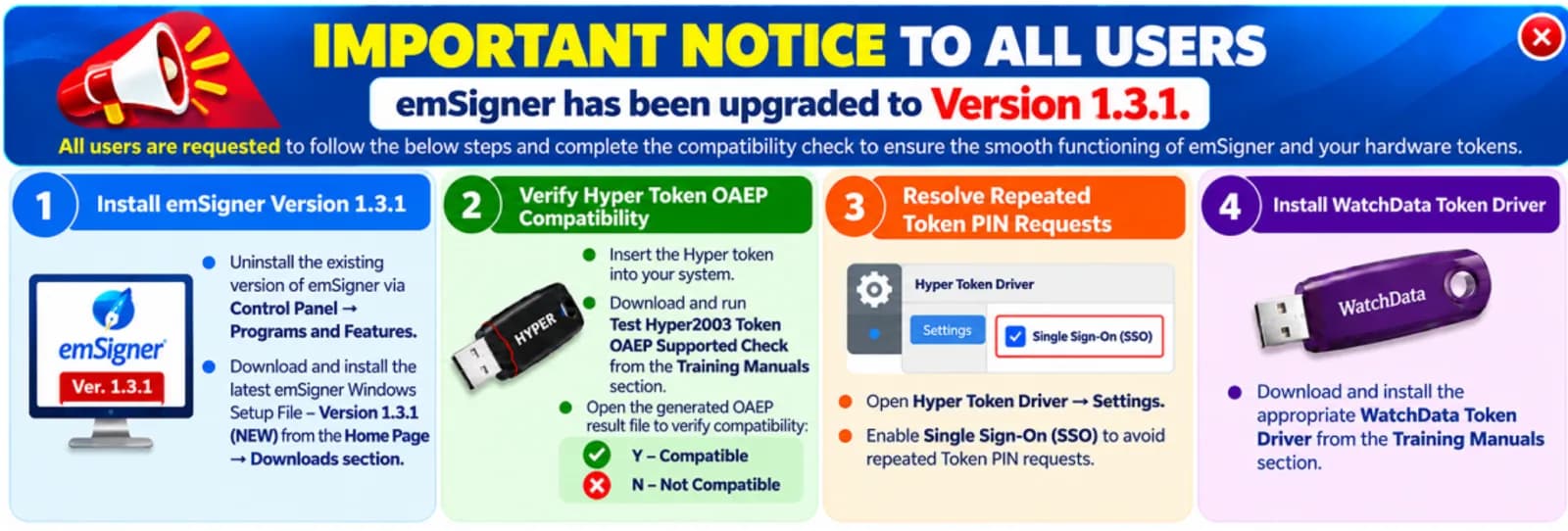
- Uninstall the old emSigner from Control Panel, then Programs and Features. On the portal’s home page, click Download emSigner for Windows, install it, then right-click the emSigner icon on your desktop and choose Run as Administrator.
- Hyper tokens: under Training Manuals, download “Hyper2003 token OAEP Supported Check”, plug in the token and run the file. Y means the token works for login, encryption and decryption. N means it does not.
- If you see N: ask your token vendor for a replacement token that supports OAEP, check that it shows Y, then complete the video verification for re-KYC and install your certificate on the new token.
- If the token keeps asking for its PIN, turn on Single Sign-On (SSO) in the Hyper token driver settings.
- WatchData token users: install the WatchData token driver from the Training Manuals section.
What is on the portal
We counted the open AP tenders on Tenderkart on 17 October 2026:
- Mostly works. 1,883 of 2,319 were for works, 390 for goods and 46 for services.
- Short deadlines. 1,558 closed within 7 days.
- Mostly small. The middle tender was worth about ₹9.8 lakh; 52 were worth ₹10 crore or more.
How to register
- Set up your computer first: emSigner 1.3.1, and a DSC token that passes the check above.
- Open tender.apeprocurement.gov.in and click Register ? under the login box.
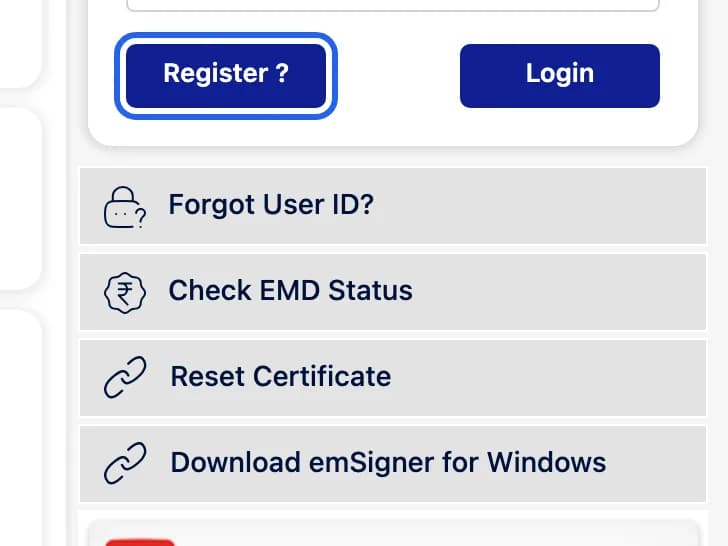
On tender.apeprocurement.gov.in. Highlight added by Tenderkart. Screenshot taken 17 October 2026. - Fill the supplier registration with your DSC plugged in, then submit. The portal uses emSigner for both registration and login.
The portal’s FAQ says the registration fee is “waived off. However it is for a limited period only”, and that registration is valid for one year. Andhra Pradesh and Telangana run the same software; the registration steps in our Telangana guide follow the same pattern.
How to log in
- Plug in your token and make sure emSigner 1.3.1 is running.
- On tender.apeprocurement.gov.in, enter your user ID and password and click Login.
- Select your certificate when asked, and enter the token PIN.
- Forgot Password ? and Forgot User ID? are next to the login box. If you still cannot get in, email [email protected] with your firm’s PAN.
- New DSC? Use Reset Certificate under the login box.
- New mobile number or email? Change them under Profile after logging in. If you cannot log in, email support with the change on your business letterhead.
Fees and EMD
- Each tender states its fees. The FAQ says the process fee and the corpus fee are paid online, through the payment gateway on the portal.
- Check EMD Status on the home page shows your EMD without logging in.
- Telangana changed the same kind of fees on 15 October 2026. Andhra Pradesh had announced no change when we checked; read each tender’s fee clause.
Fixes for common problems
The token is not read, or signing fails
Remove the old emSigner, install 1.3.1, run it as administrator and check the token. A Hyper token that shows N needs replacing.
The token keeps asking for its PIN
Open the Hyper token driver, go to Settings and turn on Single Sign-On (SSO).
You changed your DSC
Use Reset Certificate under the login box to link the new one to your account.
Helpdesk
- AP eProcurement helpdesk: 9154383633, 9154383634, 7337318402 or 7337318403. Email [email protected]. 9 am to 8 pm, Monday to Saturday, except public holidays.
- Forgot your user ID: email the same address with the PAN of the registered individual or firm.
- E-auctions: Andhra Pradesh holds them on the Konugolu portal (G.O.Ms.No.16, 27 September 2018).
Questions people ask
Is AP eProcurement registration free?
For now, yes. The portal’s FAQ says the registration fee is waived off, but only for a limited period. Registration is valid for one year.
I forgot my AP eProcurement user ID. What do I do?
Use “Forgot User ID?” on the login page. The FAQ also says you can email [email protected] with the PAN of the registered individual or firm, saying you do not recall your user ID and password, and the support team replies with your user ID.
Which emSigner version does AP eProcurement need?
Version 1.3.1. Since October 2026 the portal asks you to uninstall the old emSigner, install the 1.3.1 Windows setup file from the home page, and run it as administrator.
My Hyper token shows OAEP N. What now?
The token does not support OAEP, which emSigner 1.3.1 needs. AP’s guide of October 2026 says to ask your token vendor for a replacement that shows Y, complete the video re-KYC, and install your certificate on the new token.
How do I change my registered mobile number or email?
Log in and change them under Profile. If you cannot log in, email the support team with the change on your business letterhead.
What is the AP eProcurement helpdesk number?
9154383633, 9154383634, 7337318402 or 7337318403; email [email protected]. 9 am to 8 pm, Monday to Saturday, except public holidays.
Where are AP e-auctions held?
On the Konugolu portal. Under G.O.Ms.No.16 of 27 September 2018, Andhra Pradesh moved its government e-auctions to Konugolu.