

CPPP, the Central Public Procurement Portal at eprocure.gov.in, is where central ministries and departments publish their tenders. It runs on GePNIC, the e-procurement software of the National Informatics Centre (NIC). So do the portals for central public sector enterprises (etenders.gov.in) and defence (defproc.gov.in), and 29 of the 35 state and union territory portals whose tenders we track, from MahaTenders and JKTenders to Kerala, Uttar Pradesh, Tamil Nadu, Odisha, Punjab and Rajasthan.
The screens and steps are the same on all of them. This guide covers them once, then lists what each state does differently. CPPP’s home page now calls it GeM-CPPP; the address and the steps are unchanged. We checked the portals and NIC’s manuals on 17 October 2026.
The short answer
- Cost: NIC charges nothing to enroll. Some states charge, such as Maharashtra (₹500 per bid) and Kerala.
- DSC: Class 3, signing certificate only. One DSC per account.
- Login: your email as the login ID, a password and a captcha, then your DSC.
- Browser: Chrome, Firefox or Edge.
- Help: NIC’s 24×7 helpdesk, 0120-4001002, 0120-4001005 or 0120-4493395.
Which portal you need
| Tenders from | Portal |
|---|---|
| Central ministries and departments | CPPP, eprocure.gov.in |
| Central public sector enterprises | etenders.gov.in |
| Defence | defproc.gov.in |
| State departments, boards and local bodies | Your state’s portal, listed below |
Each portal keeps its own accounts, so enroll on every portal you bid on. You can use the same DSC on all of them: NIC’s DSC FAQ says a valid DSC bought for one e-tendering portal can be enrolled on another.
What you need before you start
- A Class 3 DSC with a signing certificate. NIC’s FAQ says bidders need “class 3 DSC with only Signing Certificate”. The DSC is issued to a person, such as a director or the authorised signatory, not to the company. Buy it at least a day before you enroll: a new DSC can take up to 24 hours to become active on the portal. Our DSC guide compares what each portal needs.
- The DSC token’s driver, installed from your certifying authority, and the token plugged in.
- An email address and a mobile number. The email becomes your login ID and can never be changed. Both get verification codes during enrollment.
- Your firm’s details: PAN (for Indian bidders), registration number, registered address, names of partners or directors, year of establishment, legal status and, if you have one, your MSME category.
- Chrome, Firefox or Edge. NIC’s release 1.09.22 removed the old browser-specific settings, and every portal we checked runs version 1.09.24.
How to enroll, step by step
- Open the portal, for example eprocure.gov.in/eprocure/app, and click Online Bidder Enrollment in the right-hand column.
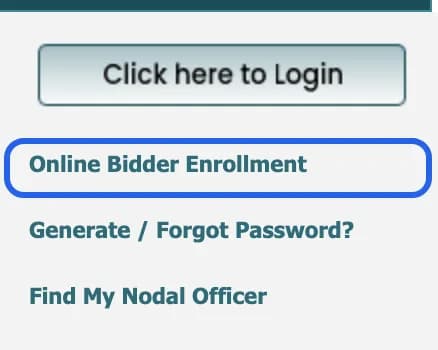
On CPPP’s home page. Highlight added by Tenderkart. Screenshot taken 17 October 2026. - Fill the form. Your Login Id is your email; the form warns that it “cannot be modified once registered”. Then enter a correspondence email (it can be the same), your mobile, your company details and a contact person. Tick Preferential Bidder if you are an MSE or a startup, and pick the category. Type the captcha and click Submit.
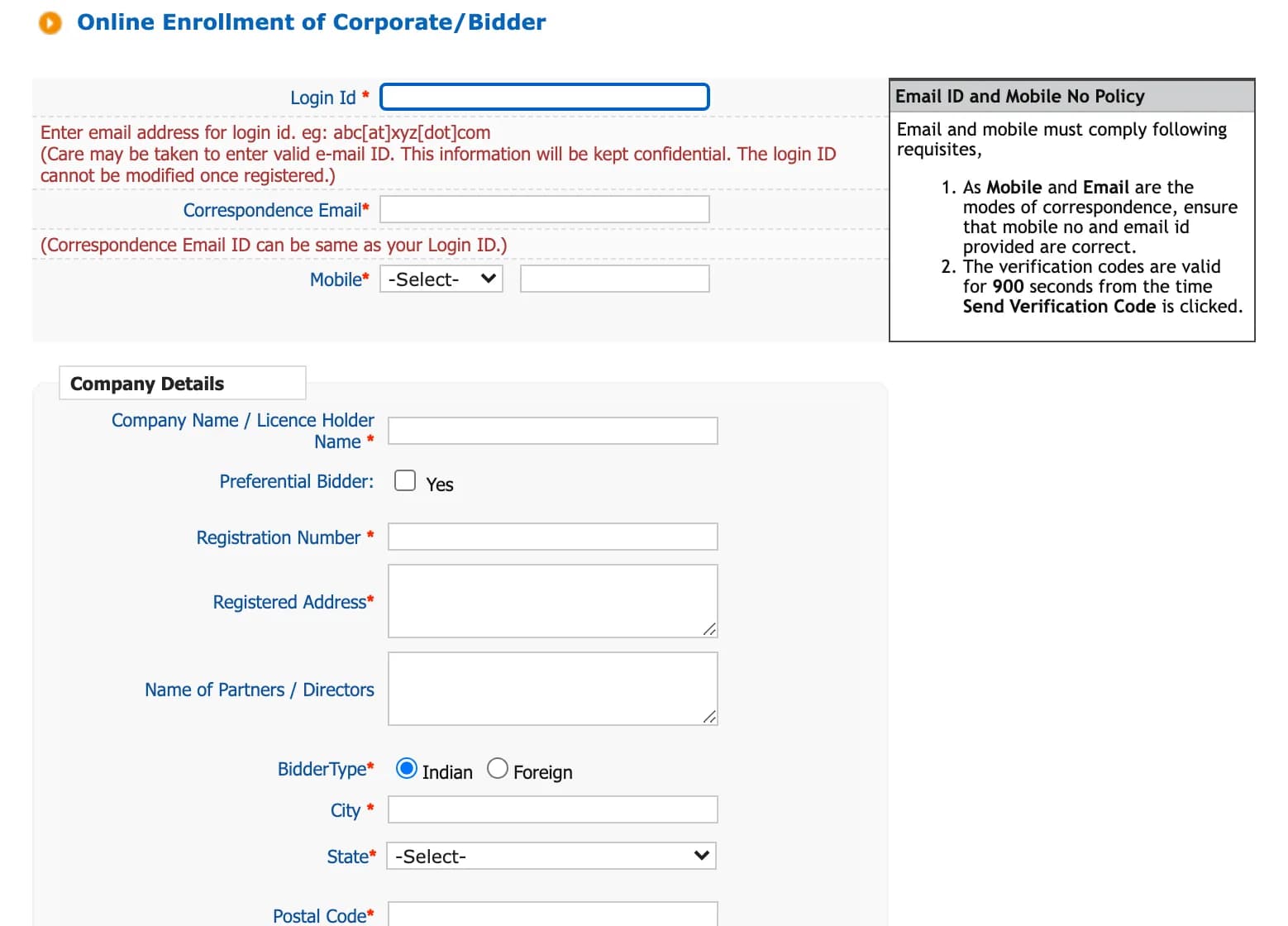
The enrollment form is the same on every NIC portal. This one is on MahaTenders. Screenshot taken 17 October 2026. - Enter the verification codes sent to your email and mobile. They expire 900 seconds, or 15 minutes, after they are sent. Then set your password.
- Log in with your login ID, password and captcha. The portal now asks you to register your DSC: plug in the token, select your certificate and click OK. NIC’s manual is clear that you become a valid bidder only after this step.
- Add your GST details when the portal asks, and save.
- MSEs and startups: finish the preference from the MSME or Startup India icon under My Accounts, then Privileges, as the form instructs.
How to log in
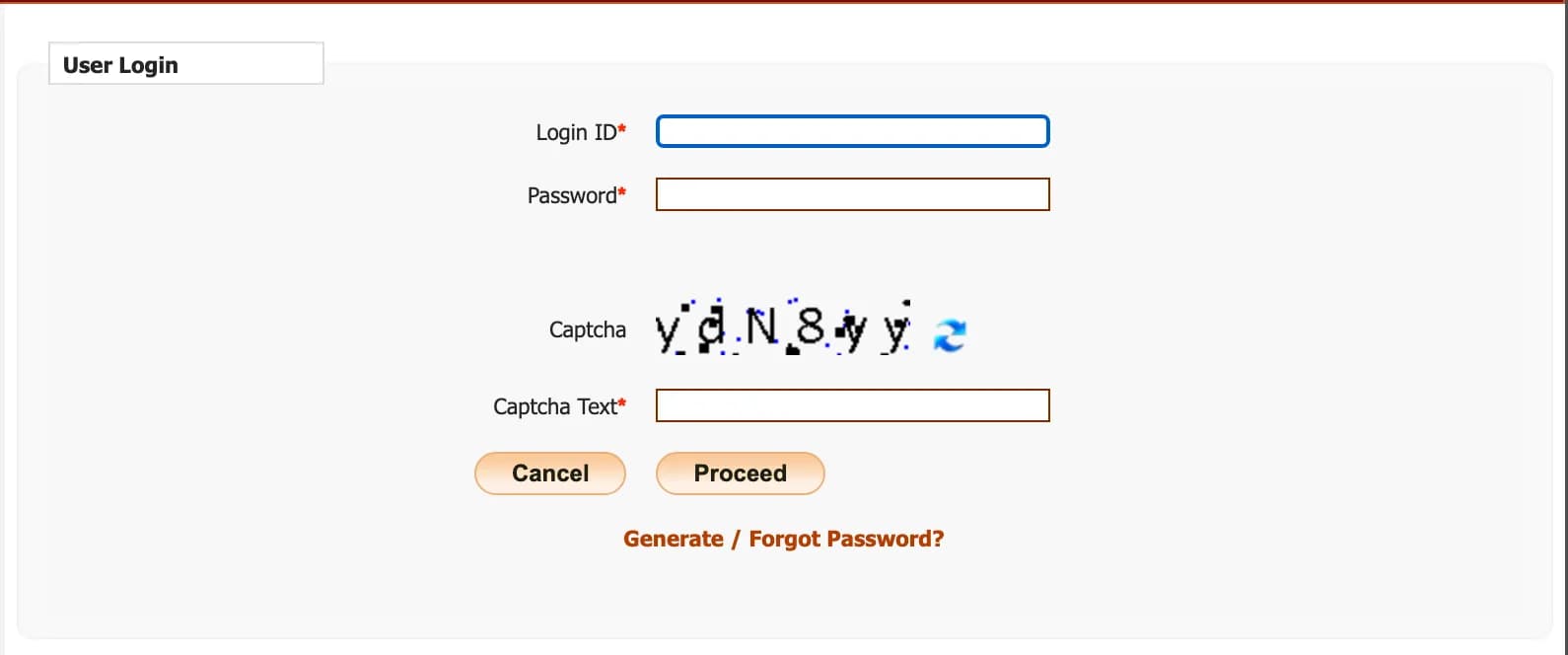
- Plug in your DSC token.
- Click Click here to Login. Enter your login ID (your email), your password and the captcha, and click Proceed.
- When the portal asks for your DSC, select your certificate and enter the token PIN.
Forgot your password? Click Generate / Forgot Password?. NIC’s FAQ says the new password goes to the alternate email in your profile. To change it yourself, use Change Password under My Accounts. You can edit most of your profile later, but never the login ID.
DSC rules that catch people out
- One DSC, one account. On a portal, a DSC maps to one user account at a time.
- A mapped DSC cannot move. NIC’s instructions say a DSC “once mapped to an account cannot be remapped to any other account. It can only be Inactivated.” CPPP’s Downloads page has a DSC deactivation form for bidders.
- Renewing. If your DSC has expired, the portal inactivates it and asks for a new one at your next login. If it is about to expire, log in with the old DSC, open DSC information on your dashboard and remove it, log out, then log in again and enroll the new one.
- Wrong PIN too often blocks the token. Only the certifying authority that issued it can unblock it.
- Never use another firm’s DSC to upload your bid. NIC’s FAQ says it is illegal under the IT Act. In a joint venture or consortium, one partner may authorise another’s DSC holder, with an authorisation signed by both in the bid.
- Foreign bidders need a DSC from an Indian certifying authority. NIC says some of them issue DSCs to foreign bidders without a visit to India.
How to submit a bid
- Find the tender with Search Active Tenders, by keyword or tender ID. Tender documents are free to download. NIC advises downloading them after logging in, so that any corrigendum reaches you by email.
- Add the tender to My Tenders, open it and click Proceed for Bid Submission. Accept the terms.
- Fees and EMD: say whether you claim an exemption. If you do, upload your proof and sign it with your DSC. If not, choose to pay online or enter the details of your offline instrument. Check them before you confirm.
- Upload the documents for each cover and sign them with your DSC. Scan at 75–100 dpi to keep files small. Fill only the BoQ file attached to the tender: enter values only in the cells meant for you, and do not rename the file or its sheets, or the portal cannot read your rates.
- Click Freeze Bid. NIC’s instructions say bids which are not frozen “are considered as Incomplete/Invalid bids”.
- Print the bid summary. It is your proof of submission and your entry to the bid opening.
If the tender allows it, you can resubmit until the deadline, and the new bid replaces the old one. Changing even one document means uploading that whole cover again. The server clock at the top of the portal, in Indian Standard Time, decides every deadline. For an offline EMD, the original must reach the department by the deadline, and its details must match the scan you uploaded.
Fixes for common problems
Money left your account but the payment does not show
Go back to the payment page, choose Pay Online and SBI MOPS, and click Payment Verification. Kerala’s portal says the status can take up to 72 hours to update. MahaTenders asks bidders to email the bank reference number to [email protected]. Pay a few days early: several states ask bidders using other banks through SBI MOPS to pay three or four days ahead.
The portal does not list your DSC
Install the token driver from your certifying authority and plug the token in before you log in. A DSC issued in the last 24 hours may not be active yet. If the DSC is mapped to another account, it has to be inactivated there first.
A security warning when you open the portal
NIC’s FAQ says some browsers do not yet trust the certificate the portals use, and asks you to download the trust chain from the portal’s Downloads page and trust it once.
Your BoQ rates were not read
The portal reads the BoQ file only if its structure is unchanged. Use the file attached to the tender, fill only the open cells, and keep the file and sheet names as they are.
What each state does differently
The steps above work on every state portal below. These are the differences we found on 17 October 2026.
Maharashtra: MahaTenders (mahatenders.gov.in)
An application fee of ₹500 per bid since 15 August 2024. Payments go through SBI MOPS, and bidders paying from other banks are asked to pay four days in advance. For payment problems, email the bank reference number to [email protected]. Our MahaTenders guide covers it in detail.
Kerala: etenders.kerala.gov.in
Since 1 January 2026, under G.O.(Rt) No. 159/2025/ITD, Kerala charges a one-time registration fee of ₹500, a yearly renewal fee of ₹100, and a processing fee on every bid of ₹250 to ₹1,300 depending on the tender value, each plus 18% GST. Our Kerala guide has the slabs and steps.
West Bengal: tenders.wb.gov.in
West Bengal has a new portal. Under Order No. 2961-FY of 12 August 2026, PWD, PHE, GTA, P&RD, I&WD, Health, all District Magistrates’ offices and all Zilla Parishads float fresh tenders only on tenders.wb.gov.in from 17 August 2026. Under Order No. 3775 FY of 8 October 2026, the tenders listed in its Annexure I, floated on the new portal between 11 and 20 September 2026, are being cancelled and floated again because of technical glitches. The older wbtenders.gov.in is still in use, so check you can log in on the site your tender is on. Help: [email protected]; for EMD, [email protected].
Punjab: eproc.punjab.gov.in
Every bidder must pay a registration fee and submit documents, as shown on the portal, before bidding. If you pay through a bank other than SBI, pay at least three working days before the deadline. NEFT and RTGS do not settle on Sundays, the 2nd and 4th Saturdays or bank holidays. Helpdesk: 0172-2970263 or 0172-2970284 on Punjab government working days, 9 am to 5 pm; 6284884511 on Saturdays and Sundays, 9 am to 5 pm; [email protected]. Payment help: 022-65361625 or 022-65361626, Monday to Saturday, 10 am to 7 pm.
Rajasthan: eproc.rajasthan.gov.in
Tenders charge a RISL processing fee. A 27 April 2020 circular has the bid fee, bid security and RISL fee paid on e-GRAS in one challan. Local helpdesk: 0141-2922012, Monday to Friday, 9.30 am to 6 pm.
Odisha: tendersodisha.gov.in
The State Procurement Cell validates bidders. Its helpdesk: 1800 3456 765 or 0674-2530998, working days, 10 am to 5 pm. Online payments go through ICICI Bank, whose helpdesk is 7205000695.
Tamil Nadu: tntenders.gov.in
Tamil Nadu accepts electronic bank guarantees through NeSL. NeSL’s helpdesk: 1800 599 2345.
Uttar Pradesh: etender.up.nic.in
No state fee notice on the portal. Help: NIC’s 24×7 numbers and [email protected]. Payment help: 022-65361625, Monday to Saturday, 10 am to 7 pm, or [email protected].
Haryana: etenders.hry.nic.in
No state fee notice on the portal. Help: 0120-4200462, 0120-4001002 or 8826246593.
Jammu and Kashmir and other states
JKTenders (jktenders.gov.in) had no announcements and lists NIC’s 24×7 helpdesk. On every portal, each tender still sets its own tender fee and EMD, so read its notice.
Helpdesk
- NIC 24×7: 0120-4001002, 0120-4001005 or 0120-4493395. From outside India, add +91. Email [email protected].
- Policy questions about CPPP: [email protected].
- Questions about a tender: the tender inviting authority named in the tender.
Every NIC portal links its own Help for Contractors, Information About DSC, FAQ and Bidders Manual Kit from the home page. The manuals date from 2018 and show older screens, but the steps still hold.
Questions people ask
Is CPPP registration free?
Yes. NIC does not charge bidders to enroll on CPPP. State portals set their own fees: Maharashtra charges ₹500 per bid, and Kerala charges a ₹500 registration fee plus a fee on every bid.
Can I use the same DSC on CPPP and on state portals?
Yes. NIC’s DSC FAQ says a valid DSC bought for one e-tendering portal can be enrolled on another. Each portal keeps its own accounts, so enroll on every portal you bid on.
Can one DSC be used for two accounts on the same portal?
No. On a portal, one DSC maps to one user account at a time. A DSC mapped to one account cannot be moved to another; it can only be inactivated.
Which DSC do I need for CPPP?
A Class 3 DSC with a signing certificate. Bidders do not need an encryption certificate. The DSC belongs to a person, such as a director or the authorised signatory, not to the company.
How do I register a new DSC on CPPP?
If your old DSC has expired, the portal inactivates it and asks for a new one at your next login. If it is about to expire, log in with the old DSC, open DSC information on your dashboard, remove it, log out, and log in again to enroll the new one.
I forgot my CPPP password. What do I do?
Click “Generate / Forgot Password?” on the portal. NIC’s FAQ says the new password is sent to the alternate email in your profile.
Can I change my login ID on CPPP?
No. The enrollment form warns that the login ID cannot be modified once registered. You can edit most other profile details after logging in.
What happens if I do not freeze my bid?
The bid does not count. NIC’s instructions say bids which are not frozen are considered incomplete or invalid. Freeze the bid and print the bid summary.
Can I download tender documents without enrolling?
Yes, tender documents are free to download. NIC advises logging in to download them anyway, so that any corrigendum reaches you by email.
What is the CPPP helpdesk number?
NIC’s 24×7 helpdesk: 0120-4001002, 0120-4001005 and 0120-4493395 (add +91 from outside India). Email [email protected]. For questions about a tender itself, contact the tender inviting authority named in it.