

tender.telangana.gov.in is the Government of Telangana’s e-procurement portal. Departments, public sector undertakings, urban local bodies and universities across the state publish their tenders there. The ITE&C Department runs it, and Vupadhi Techno Services built it and runs its helpdesk.
Two things changed in October 2026: new bidder fees for tenders published from 15 October, and a new version of the emSigner software with a check on your DSC token. This guide covers both, then registration, login and bidding. We checked everything on the portal and in the government orders on 17 October 2026.
The short answer
- Registration: free for now, valid for one year.
- Bid fee from 15 October 2026: 0.05% of the tender value, at least ₹1,000. The winner pays another 0.05%. No upper cap.
- DSC: both a signing and an encryption certificate, on a token that passes the new check.
- Computer: Windows, with emSigner 1.3.1.
- Help: 73374 45545, 9 am to 8 pm, Monday to Saturday.
The new fees from 15 October 2026
G.O.Ms.No.6 of 9 October 2026 revised the two charges on Telangana tenders. They apply to tenders first published on or after 15 October 2026; older tenders keep the old rates.
- Transaction fee, paid by every bidder when submitting the bid: 0.05% of the estimated contract value (ECV), at least ₹1,000 per tender. For product and EPC tenders it is 0.05% of your quoted value. Where you bid for some lots of a works or services tender, it is worked out on those lots.
- eCorpus fund contribution, paid by the winner before the agreement, purchase order or work order: 0.05% of the ECV of what is awarded, at least ₹1,000.
- No caps. The old caps of ₹10,000 (tenders up to ₹50 crore) and ₹25,000 (above) are gone, and so is the old eCorpus exemption for tenders up to ₹10 lakh. Taxes and payment gateway charges are extra.
What one bid costs, before and after, at four tender values (before taxes):
| Tender value | Bidder fee before | Bidder fee now | Winner’s eCorpus now |
|---|---|---|---|
| ₹10 lakh | ₹300 | ₹1,000 | ₹1,000 |
| ₹1 crore | ₹3,000 | ₹5,000 | ₹5,000 |
| ₹10 crore | ₹10,000 | ₹50,000 | ₹50,000 |
| ₹100 crore | ₹25,000 | ₹5,00,000 | ₹5,00,000 |
The “before” column uses G.O.Ms.No.7 of 2016: 0.03% from bidders and 0.04% from the winner, each with the caps above. Below a tender value of ₹20 lakh the new fee is the ₹1,000 minimum. More than half of the Telangana tenders open on 17 October 2026 (1,286 of 2,279) were below ₹20 lakh, so the minimum is what most bids will pay.
emSigner 1.3.1 and the token check
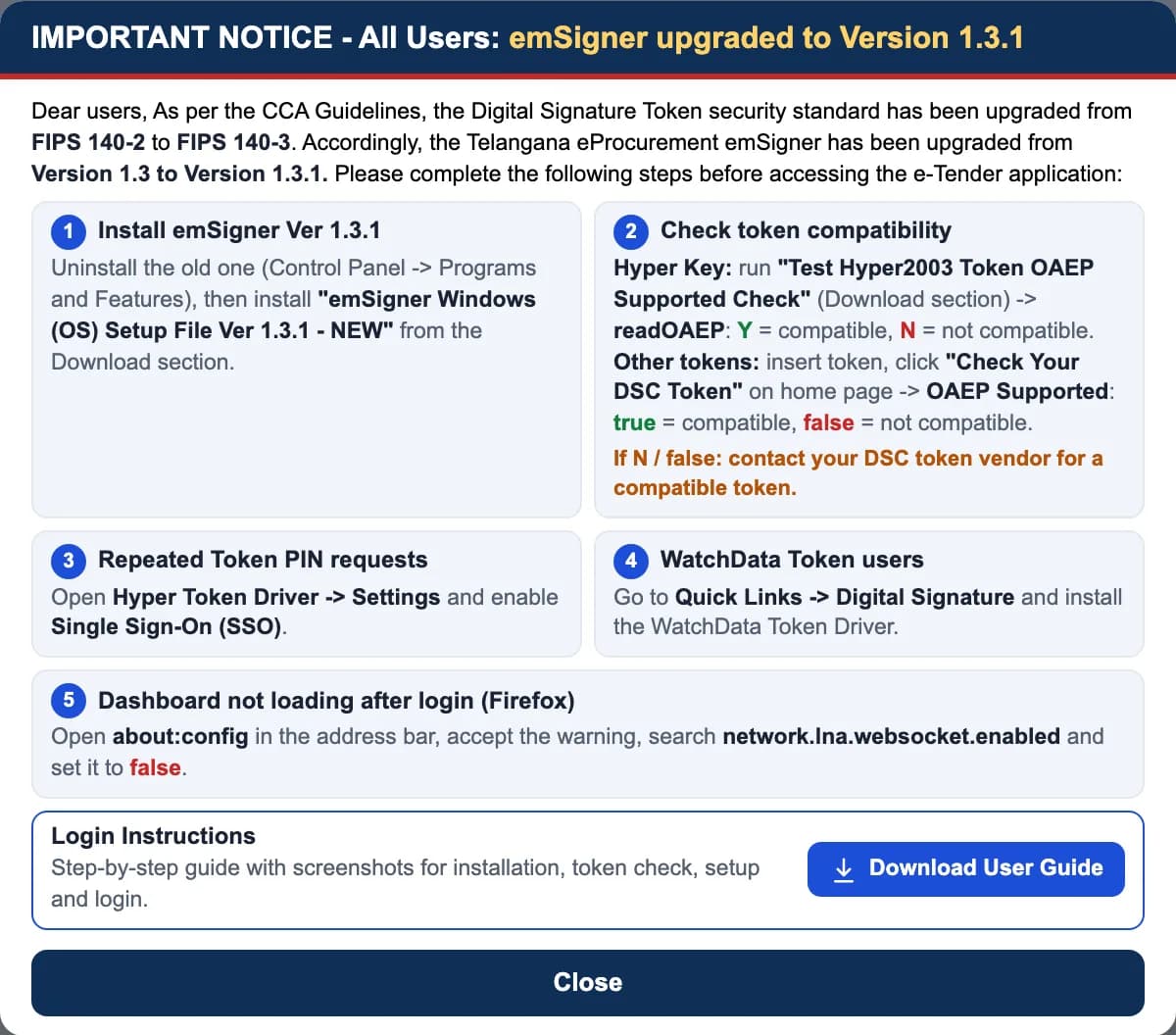
Following the Controller of Certifying Authorities, DSC tokens moved from the FIPS 140-2 security standard to FIPS 140-3, and the portal moved its emSigner from version 1.3 to 1.3.1. Before you log in or bid:
- Uninstall the old emSigner (Control Panel, then Programs and Features), and install “emSigner Windows (OS) Setup File Ver 1.3.1” from the portal’s Downloads section.
- Check your token. For a Hyper token, run “Test Hyper2003 Token OAEP Supported Check” from Downloads: readOAEP Y means compatible, N means not. For other tokens, plug in the token and click Check Your DSC Token on the home page: OAEP Supported should say true. If it says N or false, ask your DSC token vendor for a compatible token.
- If the token keeps asking for its PIN, turn on Single Sign-On (SSO) in the Hyper token driver settings.
- WatchData token users: install the WatchData driver from Quick Links, then Digital Signature.
What is on the portal
We counted the open Telangana tenders on Tenderkart on 17 October 2026:
- Mostly works. 1,761 of 2,279 were for works, 456 for goods and 62 for services.
- Short deadlines. 1,485 closed within 7 days.
- Biggest buyers. The Panchayat Raj Engineering Department had the most open tenders, then Cyberabad Municipal Corporation, TGGENCO, the state’s municipalities and Singareni Collieries.
- New fees already apply. 617 of the open tenders were published on or after 15 October 2026.
How to register
You need:
- a DSC with both a signing and an encryption certificate, on a token that passes the check above
- a Windows computer with emSigner 1.3.1
- an email and mobile for the primary contact, your office and bank details, and scans of your documents
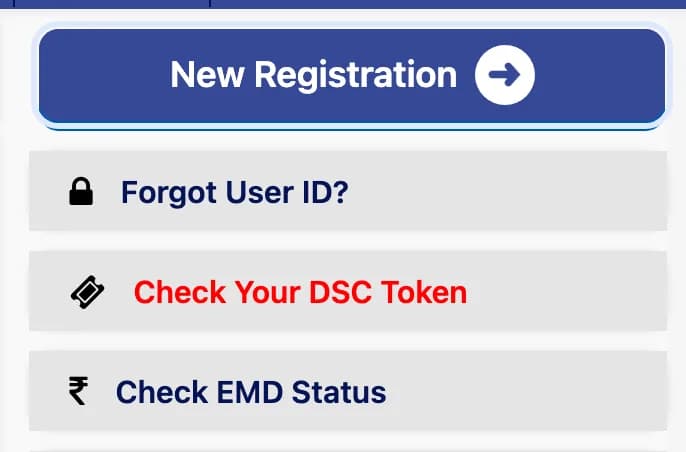
- Open tender.telangana.gov.in and click New Registration. Read the terms and conditions and agree.
On tender.telangana.gov.in. Highlight added by Tenderkart. Screenshot taken 17 October 2026. - Plug in your token. Select your signing certificate, then your encryption certificate.
- Enter the primary contact’s details and check that your chosen user ID is free.
- Enter your office and bank account details, and upload your documents.
- Submit. A confirmation message appears. An administrator then activates your account, or sends it back with remarks for you to correct, and you get an email either way.
- Before activation you can log in to see your details. If the administrator sends it back, correct the details, upload what was asked and submit again.
These steps follow the portal’s training kit for its new supplier registration module (April 2024). If a screen differs, the helpdesk below can walk you through it.
Registration is free for now. The portal’s FAQ says the fee “is waived off. However it is for a limited period only.” It is valid for one year. You can store up to 15 MB of documents in your profile and reuse them in bids.
How to log in
- Plug in your token and make sure emSigner 1.3.1 is running.
- Click Login on tender.telangana.gov.in and enter your user ID and password.
- Select your signing certificate when asked, and enter the token PIN.
Forgot your password? Use Forgot Password: enter your user name and the captcha, and the password goes to your registered email. Forgot your user ID? Use Forgot User ID? on the home page. New DSC? Use Reset DSC in the top menu.
Bidding and EMD
- The transaction fee is paid online when you submit your bid.
- The portal’s FAQ says to scan the bank guarantee or demand draft for the EMD and attach it to the technical bid, and hand the original to the department at the technical bid opening. Each tender’s own conditions decide.
- You can edit your bid until the closing time.
- Check EMD Status on the home page shows where your EMD stands.
Fixes for common problems
The token is not read, or signing fails
Install emSigner 1.3.1 after removing the old version, then run the token check above. A token that shows readOAEP N or OAEP Supported false needs replacing; the token vendor supplies a compatible one.
The token keeps asking for its PIN
Open the Hyper token driver, go to Settings and turn on Single Sign-On (SSO).
The dashboard does not load after login in Firefox
Type about:config in the address bar, accept the warning, search for network.lna.websocket.enabled and set it to false.
No confirmation email after registering
Log in and check the email address under Edit Profile. You can correct it there.
Helpdesk
- Technical helpdesk (Vupadhi Techno Services, Gachibowli, Hyderabad): 73374 45545, 73374 45546, 73370 23377 or 73370 26677, and [email protected]. 9 am to 8 pm, Monday to Saturday, except public holidays.
- Payment support: Axis Bank 1860-500-4971, ICICI Bank 022-61376644 or IndusInd Bank 98852 20633.
- Questions about a tender: the department that published it.
Andhra Pradesh’s portal runs on the same software. Our AP eProcurement guide covers what differs there.
Questions people ask
Is registration on tender.telangana.gov.in free?
For now, yes. The portal’s FAQ says the registration fee is waived off, but only for a limited period. Registration is valid for one year.
What fee do bidders pay on Telangana e-procurement from 15 October 2026?
For tenders first published on or after 15 October 2026, every bidder pays a transaction fee of 0.05% of the estimated contract value, at least ₹1,000, when submitting the bid. The winner also pays 0.05%, at least ₹1,000, to the eCorpus fund before the agreement. There is no upper cap. Taxes and gateway charges are extra. This is G.O.Ms.No.6 of 9 October 2026.
What was the Telangana e-procurement fee before?
Under G.O.Ms.No.7 of 2016, bidders paid 0.03% of the estimated contract value and the winner paid 0.04% to the eCorpus fund, each capped at ₹10,000 for tenders up to ₹50 crore and ₹25,000 above. Tenders published before 15 October 2026 still follow the old rates.
Do I need an encryption certificate for Telangana tenders?
Yes. The portal’s FAQ says signing and encryption are both mandatory to access and submit a bid, and registration asks you to select both the signing and the encryption certificate.
What is emSigner and which version do I need?
emSigner is the Windows program the portal uses to read your DSC token. Since October 2026 the portal asks for version 1.3.1: uninstall the old one, then install the 1.3.1 setup file from the portal’s Downloads section.
What does readOAEP N mean?
Your Hyper token does not support OAEP, which emSigner 1.3.1 needs. The portal asks you to contact your DSC token vendor for a compatible token. For other tokens, “Check Your DSC Token” on the home page should show OAEP Supported: true.
What is the Telangana e-procurement helpdesk number?
The technical helpdesk run by Vupadhi Techno Services: 73374 45545, 73374 45546, 73370 23377 or 73370 26677, and [email protected], from 9 am to 8 pm, Monday to Saturday, except public holidays.