

Buyers and sellers log in to GeM, the Government e-Marketplace, through the same page. The login takes your user ID and a captcha first, then your password on the next screen. This guide covers logging in, the password and user ID fixes GeM offers, what to do when you cannot log in, and signing in bids. We checked it on gem.gov.in on 17 October 2026.
The short answer
- Login: gem.gov.in, then Login. User ID and captcha, then your password.
- Forgot your password: “Forgot your GeM password?” emails a reset link.
- Forgot your user ID: Know Your User ID, under Raise a Ticket.
- Locked out: Unlock User Id, under Raise a Ticket.
- Help: 1800-419-3436, 9 am to 10 pm, Monday to Saturday.
How to log in to GeM
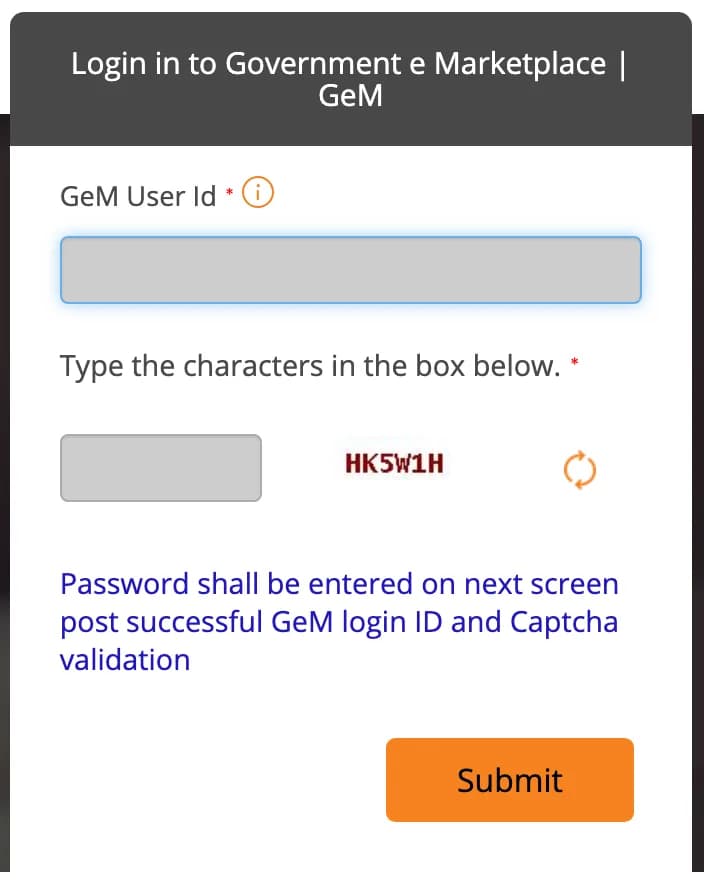
- Open gem.gov.in and click Login. You reach GeM’s single sign-on page, sso.gem.gov.in.
- Enter your GeM User Id. It is case-sensitive.
- Type the characters shown in the captcha box and click Submit.
- Enter your password on the next screen.
Government buyers: if your GeM ID is linked to an NIC or other government email, the next screen shows that email address masked. Enter the email account’s password there, as GeM’s buyer FAQ explains.
Not registered yet? The login page links to Register as Buyer and Register as Seller. Our GeM seller registration guide covers every step.
Passwords and user IDs
- Password rules: 8 to 20 characters, with an upper case letter, a lower case letter, a number and a special character. Changing it in Account Settings needs an OTP.
- Forgot your password: click “Forgot your GeM password?”, enter your user ID and the captcha, and GeM emails you a reset link.
- Forgot your user ID: use Know Your User ID under Raise a Ticket with your mobile number, or call the helpdesk with your personal PAN and company PAN.
- A user ID is permanent. GeM says it cannot be edited or deleted once created.
If you cannot log in
- Check the basics first: GeM’s FAQ says most failed logins come from a wrong user ID or password, a wrong captcha, or an old browser cache. Clear the cache, or try a private window.
- Too many wrong passwords: use Unlock User Id under Raise a Ticket. GeM says it applies only to accounts disabled for that reason.
- Not used for more than three months: GeM’s FAQ says to send your user ID and PAN to the GeM helpdesk.
- A secondary buyer shown as disabled: your primary user has deactivated you. Ask them to activate you again; they can do it from Manage Posts.
- Login trouble on GeM’s side: GeM had intermittent login problems on 10, 11 and 18 August 2026, and extended the deadlines of affected bids. Check the notices on gem.gov.in before assuming the fault is yours.
Signing after you log in
Some actions need you to sign: taking part in a bid or reverse auction, accepting a contract or an amended one, and generating an invoice. GeM accepts three ways:
- an OTP, which GeM says it supports for a limited time and will withdraw later
- e-sign, after registering with eMudhra using your PAN or Aadhaar
- a DSC; GeM accepts only Class 3 certificates for digital signing
GeM has not announced a date for ending OTP signing. Setting up e-sign or a DSC now avoids a scramble before a deadline. Our DSC guide compares what each tender portal needs.
Log in safely
GeM asks users not to enter their login details on look-alike pages, and warns about calls that promise help in winning contracts in return for payment. Type gem.gov.in yourself rather than following links in messages.
GeM helpdesk
- Phone: 1800-419-3436, 1800-102-3436 or 14550, 9 am to 10 pm, Monday to Saturday.
- Email: [email protected].
- Raise a Ticket on gem.gov.in, using your registered user ID and an OTP. You can track it and escalate it to level 2 support from the same section.
Questions people ask
How do I log in to GeM?
Open gem.gov.in and click Login. Enter your GeM user ID and the captcha, click Submit, and enter your password on the next screen. The user ID is case-sensitive.
Does GeM login need an OTP?
Not to log in: GeM asks for the user ID, the captcha and then the password. OTPs come later, for example to verify an email, change your password, or sign a bid if you have not set up e-sign or a DSC.
Why can’t I log in to GeM?
GeM’s FAQ gives three usual reasons: a wrong user ID or password (the user ID is case-sensitive), a wrong captcha, or an old browser cache. Clear the cache or try a private window. If the account is locked or disabled, see the next answers.
Which password do government buyers enter on GeM?
Buyers whose GeM ID is linked to an NIC or other government email enter that email account’s password. After the user ID and captcha, GeM shows the email address masked and asks for its password.
I forgot my GeM password. What do I do?
Click “Forgot your GeM password?” on the login page, enter your user ID and the captcha, and GeM emails you a reset link.
I forgot my GeM user ID. How do I find it?
Use “Know Your User ID” under Raise a Ticket on gem.gov.in with your mobile number, or call the GeM helpdesk with your personal PAN and company PAN.
My GeM account is locked. How do I unlock it?
If it was locked after several wrong passwords, use “Unlock User Id” under Raise a Ticket. If it was disabled because it was not used for more than three months, send your user ID and PAN to the GeM helpdesk. A secondary buyer shown as disabled should ask their primary user to activate them again.
Do I need a DSC to use GeM?
Not to log in. For actions such as bid participation, contract acceptance and invoices, GeM accepts an OTP, e-sign or a DSC, and says the OTP option will be withdrawn later. For digital signing GeM accepts only Class 3 certificates.
What is the GeM helpdesk number?
1800-419-3436, 1800-102-3436 or 14550, from 9 am to 10 pm, Monday to Saturday. Email [email protected], or raise a ticket on gem.gov.in.