

The Karnataka Public Procurement Portal (KPPP), at kppp.karnataka.gov.in, is where Karnataka’s departments, boards and corporations publish tenders and auctions. The Centre for e-Governance runs it. It replaced the older e-procurement portal at eproc.karnataka.gov.in, which many older guides still describe.
This guide covers registering, logging in with the two-step login KPPP added in 2025, setting up the signer, and the fixes people need most. We checked it on the portal on 17 October 2026.
The short answer
- Register on KPPP: registration moved there on 7 June 2024. The old portal no longer registers or renews suppliers.
- Login: user name, password and captcha, with two-factor authentication since 2 May 2025.
- DSC: Class 3, in the name on your PAN.
- Signing: the KPPP Digital Signer browser extension and eSigner kit, with Java 11 or above.
- Help: +91-9240214000, 9 am to 9 pm, Monday to Saturday.
What is on KPPP
We counted the open KPPP tenders on Tenderkart on 17 October 2026:
- A real mix. 1,423 of 2,827 were for works, 770 for services and 634 for goods.
- Biggest buyers. The Karnataka Forest Department and the Rural Development and Panchayat Raj Department had the most, then the Directorate of Municipal Administration, KPCL, KSRTC and the Karnataka Milk Federation.
- Deadlines. 1,355 closed within 7 days. Where a value was given, the middle tender was worth about ₹13 lakh.
What you need before you start
- A Class 3 DSC in the name on your PAN. Karnataka approves supplier registration in the name on the PAN, so the DSC must carry exactly that name. KPPP asks bidders to use a Class 3 DSC with a valid expiry date, and to renew an expired one before bidding.
- Your PAN, bank details and authorisation. Karnataka collects bank details to refund EMDs. The person registering must be authorised to act for the firm; KPPP’s Applicant Type Forms, under Tenderers Segment, have the formats.
- An email and mobile to verify during registration.
- Chrome, Edge or Firefox with the KPPP Digital Signer, and Java 11 or above.
How to register on KPPP
- Open kppp.karnataka.gov.in. The site may open in Kannada; switch to English at the top right if you prefer.
- Go to Tenderers Segment and choose Supplier Registration.
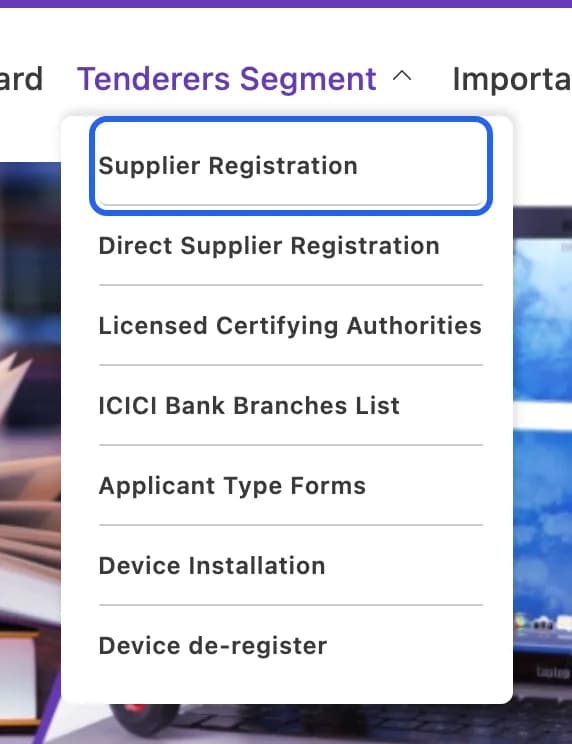
The Tenderers Segment menu on kppp.karnataka.gov.in. Highlight added by Tenderkart. Screenshot taken 17 October 2026. - Fill in your details, and verify your mobile number and email.
- Map your DSC to the registration.
- Make the registration payment. KPPP offers a challan among the ways to pay, and shows the amount at this step.
- Track your application under Supplier Registration Status. On the old portal, approval took at least one working day and came with an email either way.
Already registered on the old eproc.karnataka.gov.in? Since 7 June 2024 registrations and renewals happen only on KPPP.
How to log in
- Click Login on kppp.karnataka.gov.in and enter your user name, password and the captcha.
- Complete the second step. KPPP has had two-factor authentication since 2 May 2025.

KPPP’s announcement of two-factor login. Screenshot taken 17 October 2026. - Sign with your DSC when the portal asks.
KPPP’s password rules ask for 8 to 20 characters, with upper and lower case letters, a number and a special character. If your dashboard does not appear after login, KPPP says to update, change or reset your password to meet them.
The KPPP Digital Signer
After you log in, KPPP checks your computer and asks you to install what is missing:
- The Karnataka Public Procurement Portal Digital Signer extension for your browser: Chrome, Edge or Firefox.
- Java 11 or above. The first-install steps still say Java 8 or above, but the upgraded signer asks for Java 11, so install Java 11 or later.
- The eSigner installation kit: download it, extract it and double-click the esigner_installation_kit.bat file.
If the portal says “Digital Signer Upgraded, Please Download And Install latest Signer”, repeat steps 2 and 3 with the new kit.
Fees, EMD and refunds
- Registration: KPPP shows the amount when you pay. The old portal’s FAQ, still online, set ₹500 for one year and ₹100 a year to renew, paid by each signatory or nominated user.
- Tender processing fee and gateway charges are not refundable, says KPPP.
- EMD can be paid online, by bank guarantee, or partly online and the rest by bank guarantee, as the tender allows. Performance security can be an electronic bank guarantee (e-BG).
- Old EMDs: under Finance Department Note FD 618 Exp-12/2025 of 14 October 2025, departments had three months from 25 October 2025 to refund EMDs still held from tenders on the old e-procurement software. The note says amounts not refunded in that time are forfeited to the state’s Consolidated Fund, and the window closed in January 2026. For questions about a refund, write to [email protected].
- Bank account details: keep them current. After its bank merger, KPPP asked suppliers with Karnataka Vikasa Grameena Bank accounts to update their name, account number and IFSC to avoid rejected EMD refunds.
Fixes for common problems
You cannot log in since May 2025
Two-factor login started on 2 May 2025, and KPPP asked suppliers to verify and update their DSC. Renew an expired DSC and map it again in the portal.
The dashboard is blank after login
Change or reset your password to meet the password policy above.
Signing does not start
Install the KPPP Digital Signer extension for your browser, Java 11 or above, and the latest eSigner kit.
An EMD refund was rejected
Check the bank account details in your profile, especially after a bank merger.
Helpdesk
- KPPP helpdesk: +91-9240214000 or +91-9240214001, [email protected]. Monday to Saturday, 9 am to 9 pm, on government working days.
- e-Procurement Cell, Centre for e-Governance: 080-22230960 or 080-22234115, Monday to Saturday, 10.30 am to 5.30 pm. Supplier registration: [email protected]. EMD refunds: [email protected].
- ICICI Bank e-payment helpdesk: 080-41296235.
Questions people ask
Where do I register for Karnataka government tenders now?
On the Karnataka Public Procurement Portal (KPPP), kppp.karnataka.gov.in. Supplier registration moved there on 7 June 2024, and registration and renewal on the old eproc.karnataka.gov.in portal were switched off.
Is KPPP login two-factor?
Yes. KPPP turned on two-factor authentication (2FA) on 2 May 2025, after a security audit, and asked registered suppliers to verify and update their DSC to avoid login problems.
Which DSC do I need for KPPP?
A Class 3 DSC with a valid expiry date. Karnataka approves supplier registration in the name on the PAN, so buy the DSC in exactly that name.
What software does KPPP need for signing?
The Karnataka Public Procurement Portal Digital Signer: a browser extension for Chrome, Edge or Firefox, plus the eSigner installation kit. Since the signer was upgraded, the portal asks for Java 11 or above.
How much does KPPP registration cost?
KPPP asks for a registration payment and shows the amount during registration. The old portal’s FAQ, still online, set ₹500 for one year and ₹100 a year to renew.
I cannot see the dashboard after logging in to KPPP. What do I do?
KPPP’s notice says to update, change or reset your password to meet its password policy. Its password rules ask for 8 to 20 characters with upper and lower case letters, a number and a special character.
What is the KPPP helpdesk number?
+91-9240214000 or +91-9240214001, [email protected], Monday to Saturday, 9 am to 9 pm. The e-Procurement Cell is on 080-22230960 or 080-22234115.