

nProcure, at tender.nprocure.com, is the e-procurement portal of the Government of Gujarat, its boards and corporations, municipal bodies and many Gujarat PSUs. (n)Code Solutions, a division of GNFC, runs it. Gujarat requires e-procurement for purchases worth ₹5 lakh and above, so most of the state’s bigger tenders are here.
nProcure charges bidders a subscription, the portal charge, and needs a DSC with both a signing and an encryption certificate. This guide covers registration, the charge, logging in and the setup your computer needs. We checked it on the portal on 17 October 2026.
The short answer
- Register: New User on tender.nprocure.com, then pay the portal charge to activate.
- Portal charge: ₹4,130 (Standard) or ₹5,900 (Premium), per nProcure’s own guide.
- DSC: Class 3 combo, with separate signing and encryption certificates.
- Computer: Windows 8.1 or later, Java 1.8 or above, nProcure’s PKI component.
- Help: toll free 7359 021 663, 9.30 am to 8 pm.
What is on nProcure
We counted the open nProcure tenders on Tenderkart on 17 October 2026:
- Almost all works. 2,947 of 3,238 were for works and 291 for goods.
- Biggest buyers. Roads and Buildings had the most, then the Nagarpalikas, Narmada Water Resources, DGVCL, GSECL and PGVCL.
- Larger than most states. Where a value was given, the middle tender was worth about ₹31.8 lakh. 1,685 closed within 7 days.
Each department has its own sub-site, named with a short prefix such as rnbtender.nprocure.com for Roads and Buildings. The search on tender.nprocure.com covers them all.
Set up your computer
nProcure’s minimum requirements:
- Windows 8.1 or later, with full administrator rights on a company network
- Java Runtime Environment 1.8 or above
- nProcure’s PKI component, 32-bit or 64-bit, from the portal’s Important Links
- Chrome or Edge, preferably the latest version
- A legally valid Class 3 DSC with two separate certificates, signing and encryption, under the Indian root CA chain; install the token driver too
How to register
- Open tender.nprocure.com and click New User at the top.
- Fill the Register form: a user ID, a password that meets the password policy, your email, a secret question and its answer, and the captcha. Click Register.
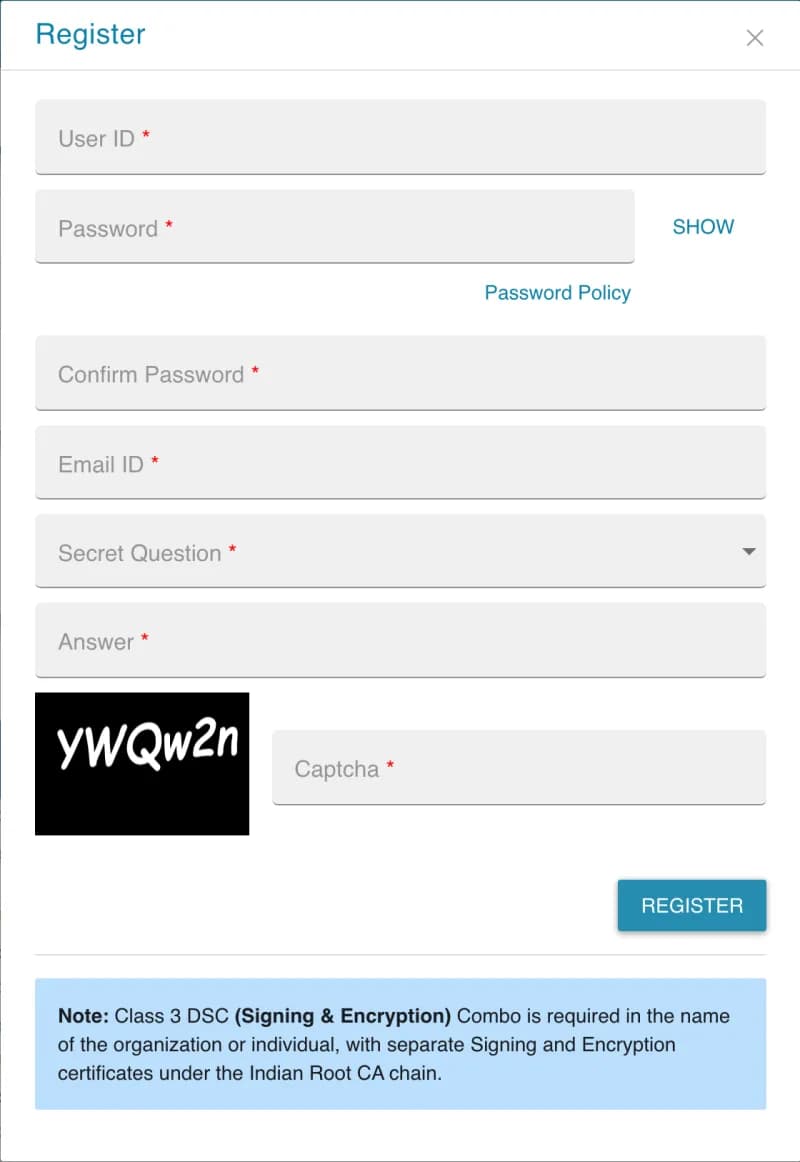
The Register form on tender.nprocure.com. Screenshot taken 17 October 2026. - Pay the portal charge to activate the account, as below.
Paying the portal charge
nProcure activates an account only after the portal charge is paid, and an inactive account is reactivated the same way. Its payment guide shows two vendor categories, Standard at ₹4,130 and Premium at ₹5,900, and asks you to choose a new subscription or a renewal. Check the amount shown when you pay.
- Click Pay Portal Charges on tender.nprocure.com.
- Log in with your user ID and password, then select your DSC.
- Check your details. The guide warns that the user ID and company name cannot be changed once you proceed to pay.
- Pay by debit card, credit card or net banking, through the Axis Bank or ICICI Bank gateway, and confirm with the OTP.
- After the activation message, click Continue and log in to bid.
How to log in
- Plug in your DSC token. Make sure Java and the PKI component are installed.
- Click Login on tender.nprocure.com, enter your user ID and password, and select your DSC.
- If nProcure has emailed you a temporary password, change it at your first login.
Forgot your password? Use Forgot Password? on the login screen.
Bidding
nProcure has separate user manuals for percentage-rate tenders (B1) and item-rate or BoQ tenders (B2), and for editing a bid, withdrawing one and bidding as a joint venture. They are under Support, User Manuals for bidder. You can edit and resubmit a bid before the deadline.
Helpdesk and training
- (n)Procure support: toll free 7359 021 663, 9.30 am to 8 pm, and [email protected]. Closed on the 2nd and 4th Saturdays and public holidays.
- Office: (n)Procure Cell, 14th Floor, GIFT One Tower, Road 5C, Zone 5, GIFT City, Gandhinagar 382355. It moved there from Info Tower; older pages still show the old address.
- Free online training: every Thursday, 3.30 pm to 4.30 pm, from the link on the portal.
Questions people ask
How much are nProcure portal charges?
nProcure’s own payment guide shows two vendor categories: Standard at ₹4,130 and Premium at ₹5,900, for a new subscription or a renewal. Check the amount shown when you pay, as rates can change.
Which DSC do I need for nProcure?
A Class 3 DSC “combo” with separate signing and encryption certificates, under the Indian root CA chain, in the name of the organisation or individual.
My nProcure account is inactive. How do I activate it?
Pay the portal charge: click “Pay Portal Charges” on tender.nprocure.com, log in with your user ID, password and DSC, check your details and pay online. Once the payment succeeds, the account is active and you can log in.
Can I change my user ID or company name on nProcure?
No. nProcure’s payment guide warns that the user ID and company name cannot be changed after you proceed to pay, so check them first.
Does nProcure need Java?
Yes. nProcure lists Java (JRE) 1.8 or above and its own PKI component (32-bit or 64-bit) among the minimum requirements, on Windows 8.1 or later, with full administrator rights.
What is the nProcure helpdesk number?
Toll free 7359 021 663, from 9.30 am to 8 pm, and [email protected]. It is closed on the 2nd and 4th Saturdays and public holidays. The (n)Procure Cell is now at GIFT One Tower, GIFT City, Gandhinagar.
Does nProcure offer training?
Yes. nProcure runs a free online training for bidders every Thursday from 3.30 pm to 4.30 pm, joined from the link on the portal.