

IREPS, the Indian Railways E-Procurement System at ireps.gov.in, is where Indian Railways buys goods, services and works. To bid, your firm needs an IREPS account. Registering for e-tenders is free. You do need a digital signature certificate (DSC) in your firm’s name and a Windows computer with IREPS’s signing software.
This guide covers every step from registration to your first bid, and the errors that most often stop people. We checked each step on ireps.gov.in and in IREPS’s own manuals on 17 October 2026.
The short answer
- Cost: e-tender registration is free. The e-auction sign-ups charge a fee.
- DSC: Class III, with your firm’s name in it.
- Computer: Windows, with Java and the IREPS Signer. Use Chrome, Edge or Firefox.
- Time: approval normally takes 3 to 4 working days. The password comes by email.
- Help: 011-41385200, 8 am to 7 pm, except Sundays and gazetted holidays.
What you need before you start
1. A Class III DSC with your firm’s name
IREPS asks for a “Class III Digital Signature Certificate with Firm’s Name”. Buy it from any certifying authority licensed by the Controller of Certifying Authorities (cca.gov.in). Get three things right before you pay:
- The organisation field must carry your firm’s name. IREPS does not accept a DSC whose organisation field is empty or says “Personal”. This applies to proprietorships too.
- Use the address you will register with. If RDSO or a zonal railway has already approved your firm, use the address in their records.
- A signing certificate is enough. Bidders do not need an encryption certificate.
Bidding on other portals too? Our DSC guide shows which DSC each portal needs, so one purchase covers them all.
2. A Windows computer with Java and the IREPS Signer
IREPS signs your login, documents and bids through the IREPS Signer, a small program on your own computer. It needs Java; IREPS’s troubleshooting note asks for JRE 1.8. The signer comes only as a Windows installer (.msi), linked as “IREPS Signer” on the IREPS home page and the login page. After installing it, right-click the signer icon on your desktop and choose “Run as administrator” the first time.
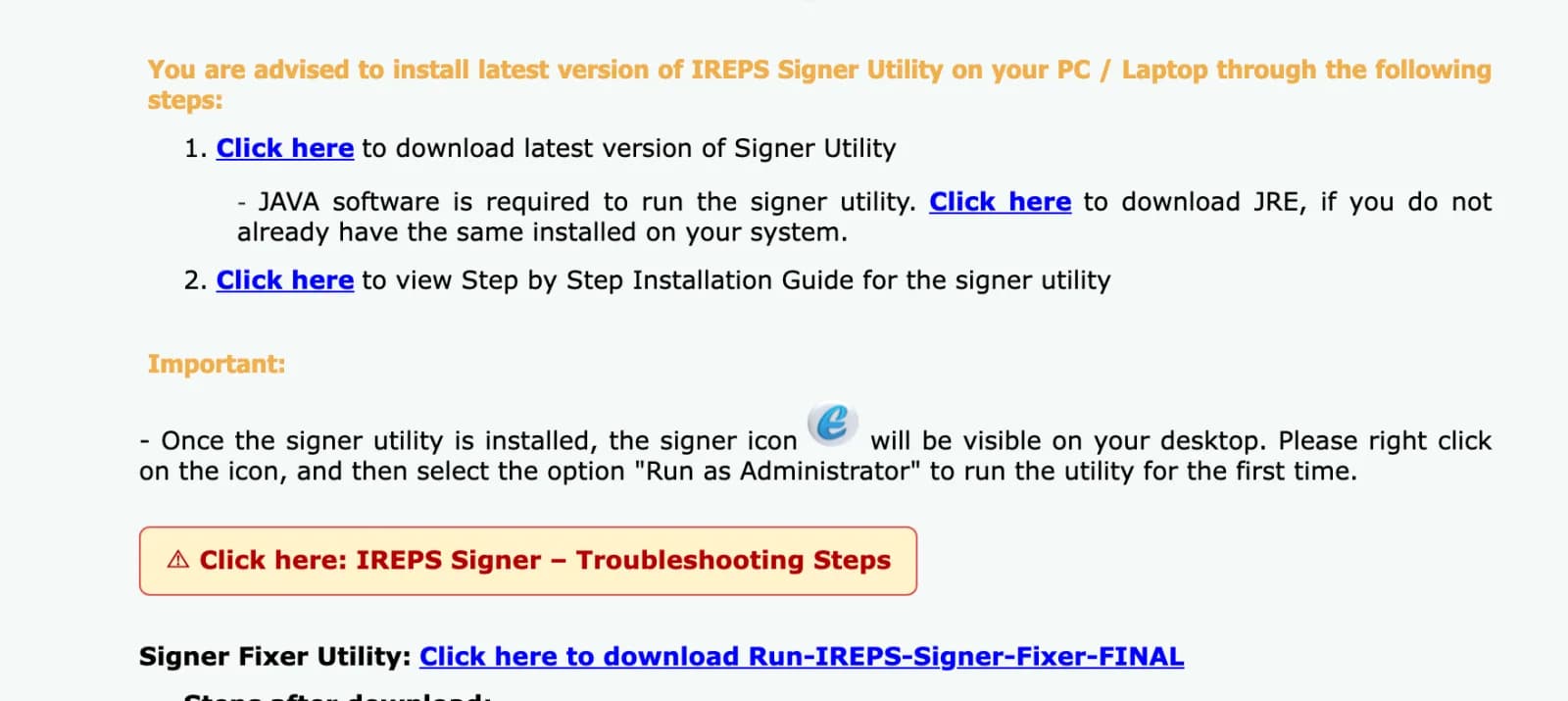
3. Chrome, Edge or Firefox
IREPS stopped working on Internet Explorer on 13 July 2024. Old guides that ask you to change Internet Explorer settings or enable Java applets no longer apply.
4. One email address for your main user
The email of your primary user becomes your IREPS user name. IREPS’s terms let you update your profile later, except your user ID and company name. Use an address your firm will keep when staff change.
5. Scans of your documents
What IREPS asks for depends on your type of firm. Expect your PAN, GST registration (or the reason you are exempt), company registration if you are a company, and your MSE registration if you want MSE benefits. You will also fill two IREPS forms, the Identification Form and the Authorization & Declaration Form. Their formats are on the upload tab.
Which sign-up you need
IREPS has two sign-ups. Most suppliers and contractors need the first. One account can cover goods and services, works, and earning or leasing contracts, but you can bid only in the areas you registered for.
| You want to | Sign up under | Fee |
|---|---|---|
| Supply goods or services | New Vendors/Contractors (E-Tender/E-Auction Leasing) | Free |
| Bid for works contracts | The same form, with Works as a work area | Free |
| Take railway assets on lease in e-auctions | The same form, then pay once in the E-Auction Leasing module | ₹10,000 + GST, not refunded |
| Buy scrap and other railway material | New Bidder (E-Auction Sale) | ₹10,000 entry fee, refundable |
Getting a product approved by RDSO or a production unit is a separate step, done in IREPS’s Vendor Approval (UVAM) module. Registration alone does not make you an approved source.
How to register on IREPS, step by step
- Open ireps.gov.in. In the menu, go to Sign Up and choose New Vendors/Contractors (E-Tender/E-Auction Leasing).
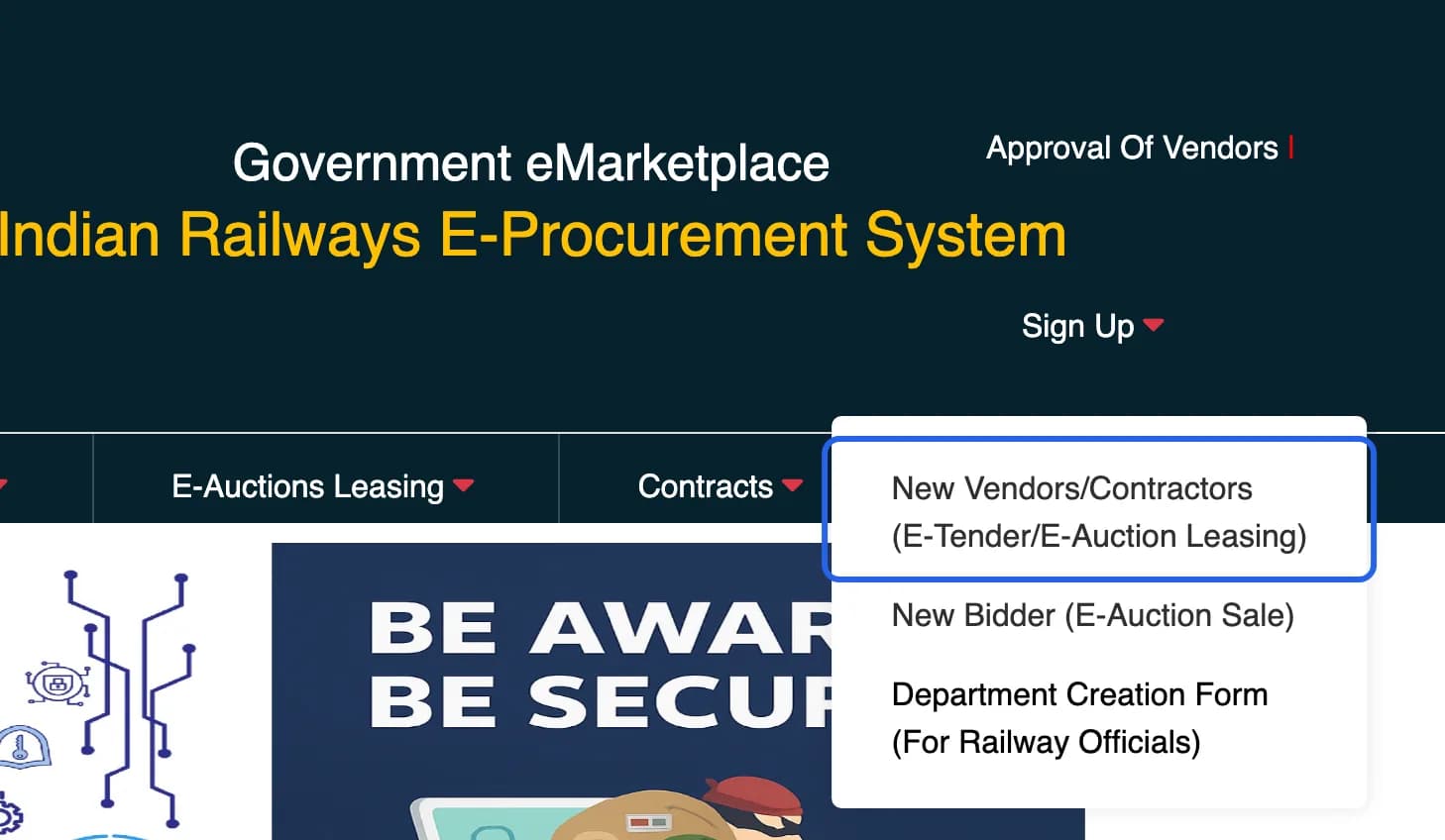
Sign Up menu on ireps.gov.in. Highlight added by Tenderkart. Screenshot taken 17 October 2026. - Choose Initiate Registration Request and click Proceed. You will come back to this page to continue a saved form, check your status or answer a query.
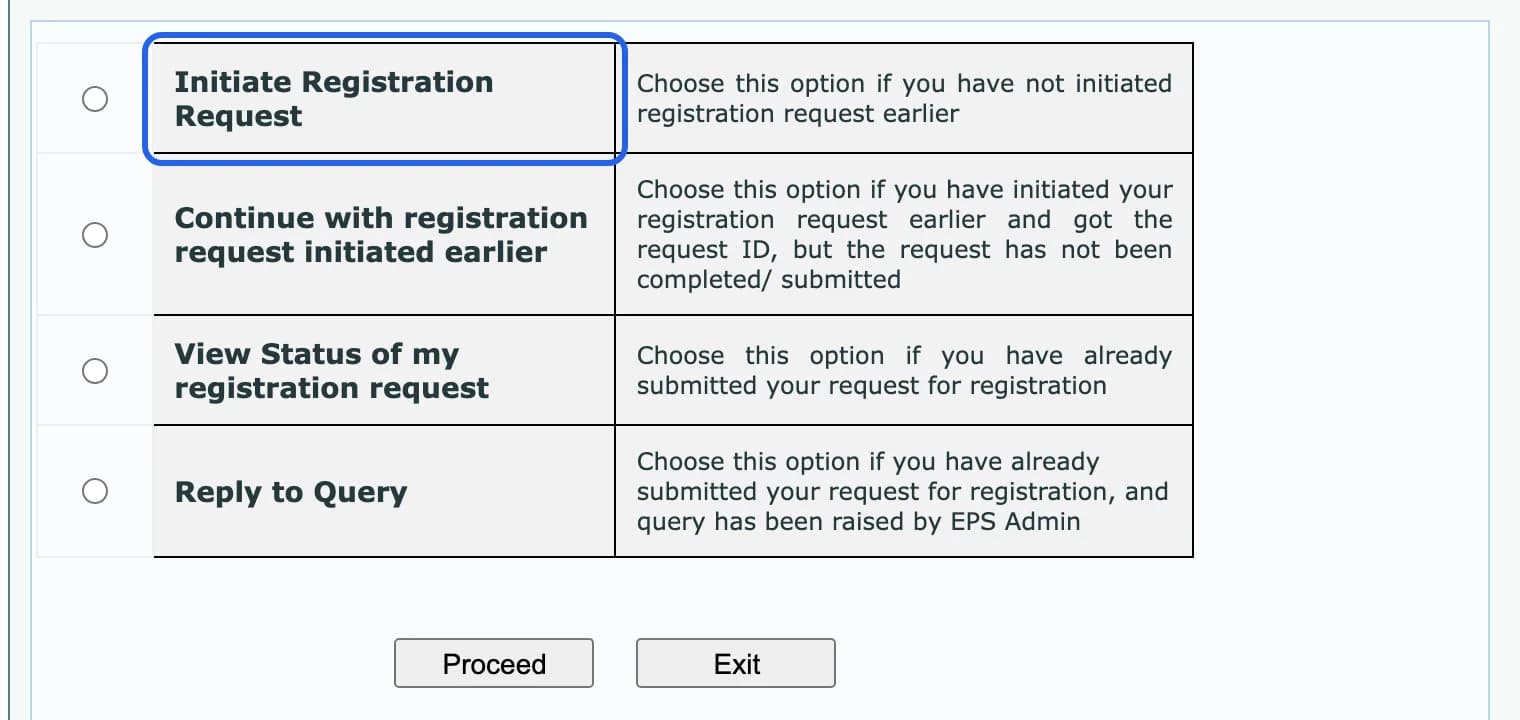
The four registration options. Highlight added by Tenderkart. Screenshot taken 17 October 2026. - Read the notes, plug in your DSC token, start the IREPS Signer and click Proceed. Select your firm’s DSC in the signer window and click Select.
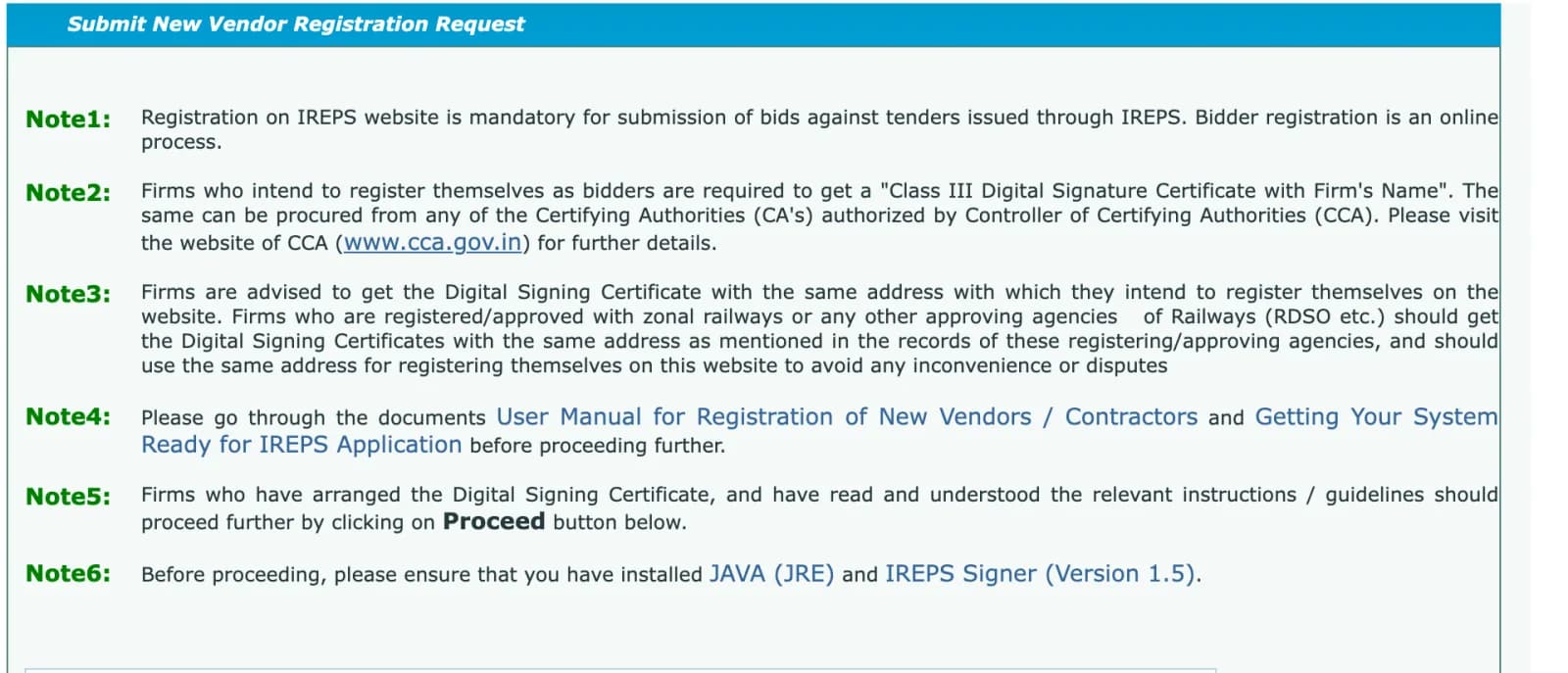
IREPS’s notes before you start: a Class III DSC with your firm’s name, Java and the IREPS Signer. Screenshot taken 17 October 2026. - Basic Details: enter your firm’s name and address, contact details, the primary user, and the work areas you want: Goods & Services, Works, Earning/Leasing. Click Save as Draft. IREPS now shows a Request ID. Write it down. You need it to continue later, to check your status and to reply to a query.
- Constitution: choose your type of firm, such as company, partnership or proprietorship, and add every director or partner.
- Approvals: if you are a micro or small enterprise, add your MSE registration here. IREPS’s manual warns that firms who skip it may lose MSE benefits.
- Statutory: enter your GSTIN, or the reason you are exempt. Enter your PAN; every Indian firm needs one except government departments, and an individual enters the owner’s PAN. Companies must also enter their registration with the Registrar of Companies.
- Upload Document: upload each document; IREPS asks you to sign every upload with your DSC. Download, fill and upload the Identification Form and the Authorization & Declaration Form from this tab. IREPS warns that a wrong document leads to rejection.
- Sign & Submit: check everything, click Sign and Submit and sign with your DSC.
- Wait for approval. Track it with View Status of my registration request and your Request ID. If the IREPS admin asks a question, answer it with Reply to Query. Approval normally takes 3 to 4 working days. IREPS then emails the password to your primary user.
Approved but no password email? On the login page, use Click Here To Reset Password Using DSC. Enter your email, set a new password and sign with your DSC.
How to log in to IREPS
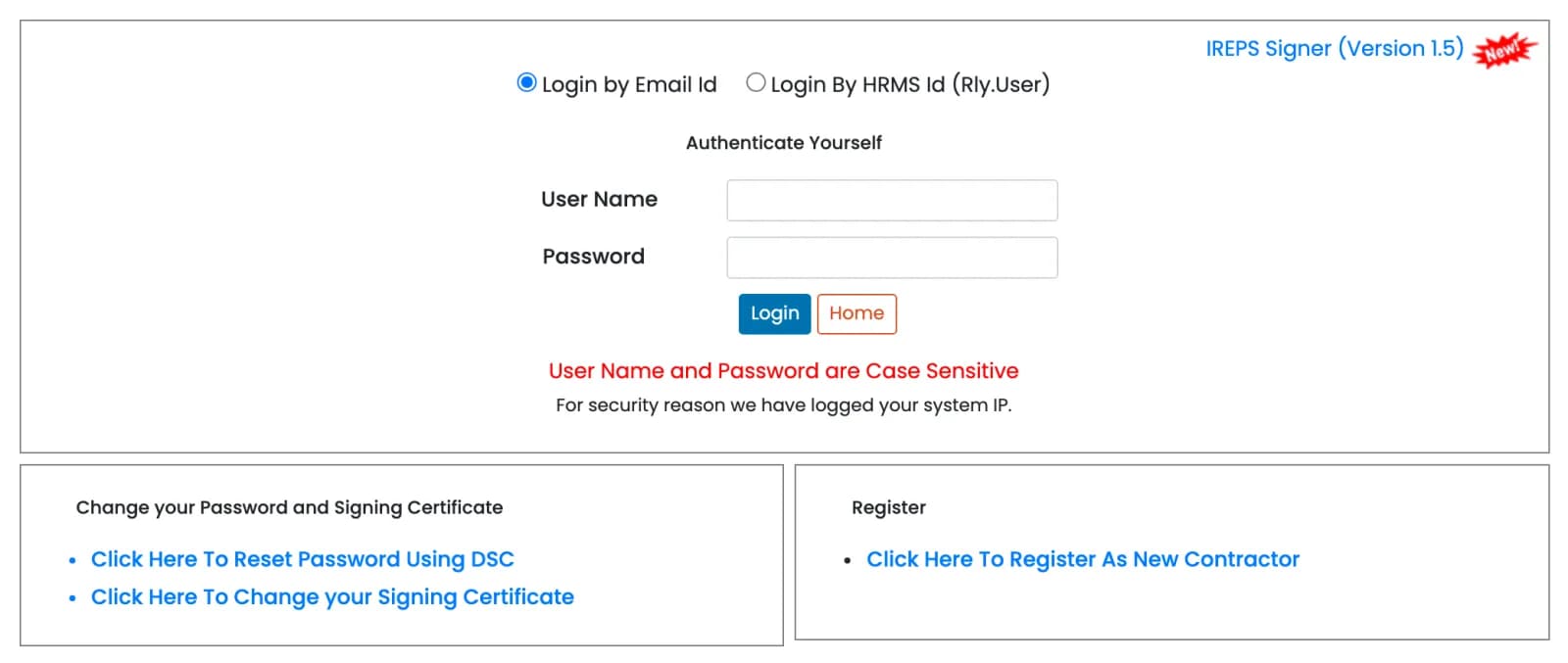
- Plug in your DSC token and start the IREPS Signer.
- Open ireps.gov.in and choose Login, then E-Tender. The same login page serves goods and services, works, and earning or leasing tenders.
- Keep Login by Email Id selected. “Login By HRMS Id” is for railway staff. Enter your user name, which is the email you registered with, and your password. Both are case-sensitive.
- When IREPS asks for your DSC, select it in the signer window and enter your token PIN.
- On your first login IREPS makes you change your password. It asks again whenever your password is more than 60 days old.
Forgot your password? Use Click Here To Reset Password Using DSC on the login page. It works with your DSC, not an email link. Got a new DSC? Register it with Click Here To Change your Signing Certificate. The name in the new DSC must match your IREPS account.
Fixes for common IREPS errors
Most IREPS problems come from the signer, the DSC or the browser. These are the messages people search for most, with the fixes IREPS itself gives.
“Failed to Open Web Signer” or the signer window never opens
Java or the IREPS Signer is missing, not running, or not trusted by your browser. Install Java and the IREPS Signer, then right-click the signer and choose “Run as administrator”. Next, open https://127.0.0.1:2175 in the same browser. In Chrome, click Advanced and proceed to 127.0.0.1; in Firefox, click “Accept the Risk and Continue”. Restart the browser and try again. The same steps fix “Failed to establish connection to the server. Kindly restart the Signer.”
Chrome asks to “Access other apps and services on this device”
Chrome is asking whether IREPS may talk to the signer on your computer. Click Allow. If the prompt never appears, clear the browser’s cache and cookies, close the browser fully, open it again and log in.
The signer still fails
Download the Signer Fixer (“Run-IREPS-Signer-Fixer-FINAL”) from the IREPS Signer page. Right-click it, choose “Run as administrator”, let it finish, then restart the signer.
“Please sign with your own certificate”
The message says the DSC you signed with is not the one linked to your IREPS user. Pick your own DSC in the signer. If you have a new one, link it first with “Click Here To Change your Signing Certificate”.
The new DSC is refused because the name does not match
IREPS links a DSC only if the name in it exactly matches the name on your IREPS user account. If the DSC carries the wrong name, get a corrected one from your certifying authority. If the DSC is right and your IREPS account is wrong, your firm’s authorised signatory asks IREPS to correct it through Ask a Question. IREPS’s procedure (version 2.0, July 2026) asks for:
- an authority letter on your letterhead naming the authorised signatory
- an affidavit on ₹100 non-judicial stamp paper, in IREPS’s format, notarised by a public notary
- the Authorization & Declaration Form and the Identification Form
- the user’s PAN and the public key of the DSC
The same procedure creates a new primary user when the old one has left your firm. It is simpler if the primary user hands over to a colleague before leaving.
Your DSC has expired
Renew it or buy a new one, then register it with “Click Here To Change your Signing Certificate”. The name rule above still applies.
“Error Code: ADM.004. Your session has expired”
Your session timed out. Log in again.
Your payment does not show “Success”
IREPS treats every other status as a failed payment. If money left your account, click Retry against the transaction; the option appears seven minutes after you pay. If that does not work, contact the helpdesk. “Authorization Pending” means your bank’s corporate net banking approver still has to approve the payment.
Find tenders and bid
Searching IREPS without logging in now needs a mobile number and an OTP. You can ask for an OTP twice an hour, and it works for the rest of the day. On Tenderkart you can browse every open IREPS tender, with filters, without an OTP.
What is open on IREPS
We counted the open IREPS tenders on Tenderkart on 17 October 2026:
- Mostly goods. 17,196 of 19,958 open tenders, or 86%, were for goods. 2,431 were for works and 331 for services.
- Short deadlines. About a third closed within 7 days. Check daily, or set an alert.
- Some are only for approved vendors. 3,855 goods tenders, about 1 in 5, were limited tenders. Under the government’s financial rules (GFR 2017, rule 162), limited tenders go to firms already registered as suppliers of the item. As a new vendor, start with open tenders.
- Works tenders show their value. The middle open works tender was worth about ₹1.6 crore.
- Busiest zones. Northern, Western and Eastern Railway had the most open tenders.
How a bid works
- Open the tender after logging in and read all its documents and conditions.
- Accept the responsiveness clauses. These are conditions where you may not quote any deviation; a deviation gets the offer rejected.
- Pay the tender document cost and the EMD, or claim an exemption and upload your proof. IREPS’s manual lists MSEs, firms registered with the zonal railway for the item, and firms approved by RDSO or a production unit for the item among those who may be exempt. Claiming an exemption you do not qualify for can get your offer ignored.
- Fill the bid tabs, from General to Fin. Offer.
- Click Encrypt and Submit and sign with your DSC. To change your offer before the deadline, use Submit Revised Bid. Only your last bid counts.
IREPS takes payments through SBI Net Banking, with no charge at present, or SBIePay. SBIePay accepts other banks’ net banking, debit and credit cards, and UPI; its charges depend on the mode. Pay a few days before the closing date.
For works, the bid security is 2% of the estimated cost, rounded to the nearest ₹100, with no upper limit. Railway Board set this flat rate on 13 March 2026, in Advance Correction Slip 11 to the General Conditions of Contract; works tenders issued before then charged less above ₹1 crore. DPIIT-recognised startups are exempt, and labour cooperative societies pay half. Each tender states its own amount, so always check it.
After you win
- Works contracts are managed on IR-WCMS at ircep.gov.in: agreement, measurements, bills and the release of your security. It uses your IREPS user ID, but the login works only after the railway marks your agreement to you. Then set the password with Forgot Password and your DSC.
- Supply contracts: IREPS says the eDispatch Note will soon be mandatory for every despatch against a stores contract (notice of 18 September 2026). Create it under Contracts, then View and Manage Contracts, then Manage Your Purchase Order.
What it costs
| Item | Cost |
|---|---|
| E-tender registration (goods, services, works) | Free |
| E-auction leasing registration | ₹10,000 + GST, once, not refunded |
| E-auction sale (scrap) registration | ₹10,000 entry fee, refundable |
| Class III DSC | Paid to the certifying authority; depends on validity and token |
| Tender document cost and EMD | Set by each tender; exemptions as above |
| Payment charges | SBI Net Banking: nil at present. SBIePay: depends on the mode |
IREPS charges nothing to register for e-tenders, so you do not need to pay anyone to do it for you. Keep your DSC and password to yourself: IREPS’s terms make you responsible for everything done with them.
What changed recently
- September 2026: IREPS added an installer for IREPS Signer 1.5.1. Version 1.5 is still offered.
- 18 September 2026: IREPS announced that the eDispatch Note will become mandatory for despatches against stores contracts.
- 1 September 2026: IREPS published new signer troubleshooting steps and the Signer Fixer utility.
- August 2026: the government said IREPS is being integrated with GeM. No date has been given, and you still register on ireps.gov.in. IREPS’s home page also advises vendors of common-use goods and services to register on GeM; see our GeM seller registration guide.
- 14 July 2026: a new procedure (version 2.0) for creating a primary user and for correcting a user’s name when it does not match the DSC.
- 13 March 2026: the bid security for works became a flat 2% of the estimated cost, with no upper limit.
- 13 July 2024: IREPS stopped working on Internet Explorer.
- Date not published: searching tenders without logging in now needs a mobile OTP.
Most of IREPS’s user manuals date from 2016 to 2018 and still show Internet Explorer and Java applet screens. The steps in them are still a good map, but follow this guide for the browser and signer setup.
IREPS helpdesk and official documents
- Phone: 011-41385200 (10 lines), 8 am to 7 pm. Closed on Sundays and gazetted holidays.
- Online: Ask a Question on ireps.gov.in. You get a Query ID; use it with your email to read the reply. The helpdesk page gives email addresses only for the SBI payment desks below.
- SBI payments: Net Banking 022-27566066, 022-27566067, 022-27560137 or 022-27566501 ([email protected]). SBIePay 022-27523618, round the clock ([email protected]).
The helpdesk handles system problems: registration, login, payments and bid submission. For a question about a tender itself, contact the railway office that issued it.
The official documents this guide is based on:
- User Guide for Registration of New Vendors / Contractors (version 1.0, October 2018)
- Getting Your System Ready for IREPS Application (version 2.0, October 2018)
- IREPS Signer download page and signer troubleshooting steps
- E-Payment FAQ (version 3.0, September 2025)
- Procedure for creating a primary user and correcting a user’s name (version 2.0, July 2026)
- Advance Correction Slip 11 to the General Conditions of Contract (Railway Board, 13 March 2026; works bid security)
- IREPS helpdesk page
Questions people ask
Is IREPS registration free?
Yes. Registering on IREPS for e-tenders (goods, services and works) is free. The e-auction sign-ups charge a fee: a one-time ₹10,000 plus GST for e-auction leasing, and a refundable ₹10,000 entry fee for e-auction sale (scrap).
Which DSC do I need for IREPS?
A Class III digital signature certificate with your firm’s name in it. A signing certificate is enough; you do not need an encryption certificate. IREPS refuses a DSC whose organisation field is empty or says “Personal”.
Can a proprietor register on IREPS with a personal DSC?
No. A proprietorship also needs a Class III DSC that carries the firm’s name. IREPS refuses a DSC whose organisation field is empty or says “Personal”.
How long does IREPS registration take?
IREPS’s registration manual says approval normally takes 3 to 4 working days. Track it with “View Status of my registration request” and your Request ID. If the IREPS admin asks a question, answer it through “Reply to Query”, or the request waits.
Do I need Java for IREPS?
Yes. The IREPS Signer, which signs your login, documents and bids, runs on Java. IREPS’s troubleshooting note asks for JRE 1.8. Java applets in the browser are no longer used.
Can I use IREPS on a Mac or a phone?
IREPS offers its signer only as a Windows installer, so plan to register, log in and bid from a Windows computer. The IREPS mobile app by CRIS is for searching tenders and information.
How do I change my DSC on IREPS?
On the login page, use “Click Here To Change your Signing Certificate”. The name in the new DSC must exactly match the name on your IREPS account. If the DSC carries the wrong name, get it corrected by your certifying authority. If the account carries the wrong name, your authorised signatory asks IREPS to correct it through Ask a Question, with a notarised affidavit on ₹100 stamp paper and the forms IREPS lists.
How do I reset my IREPS password?
Use “Click Here To Reset Password Using DSC” on the login page. Enter your user name (your registered email), set a new password and sign with your DSC.
What is the IREPS helpdesk number?
011-41385200, from 8 am to 7 pm. It is closed on Sundays and gazetted holidays. You can also use Ask a Question on ireps.gov.in.
Is IREPS registration the same as RDSO vendor approval?
No. Registration lets you bid. Approval of a product or a source by RDSO or a production unit is a separate process, done in IREPS’s Vendor Approval (UVAM) module. Some goods tenders are open only to approved firms.
What is the difference between IREPS and ircep.gov.in?
IREPS is for tenders and auctions. ircep.gov.in hosts IR-WCMS, where works contracts are managed after the award. It uses your IREPS user ID, but the login works only after the railway marks an agreement to you. You then set its password with Forgot Password and your DSC.